cheat.sh
Cheat sheet service queried with curl or the cht.sh client, covering 1000+ UNIX/Linux commands, 56 programming languages and several DBMSes.
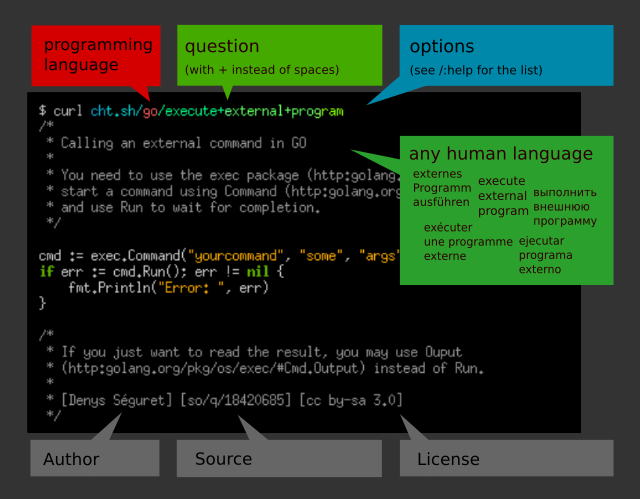
cheat.sh is a cheat sheet service that aggregates community-driven cheat sheet repositories and serves them over HTTP. It covers more than 1000 UNIX/Linux commands, 56 programming languages and several DBMSes. You query it with curl or any HTTP client, for example curl cheat.sh/tar or curl cht.sh/python/lambda. Unknown command names can be found with keyword search, such as curl cht.sh/~snapshot. The README says answers usually return within 100 ms.
Programming language questions use per-language namespaces, for example cht.sh/go/Pointers or cht.sh/python/random+string. :list lists the available sheets, and :learn returns a language overview taken from the "Learn X in Y" project. If no sheet exists for a query, the service generates one from existing cheat sheets and StackOverflow answers. Output is formatted as code in the queried language, so it can be pasted into a program. Appending /1, /2 and so on returns alternative answers. The option ?Q strips comments, ?T disables syntax highlighting, and +-word excludes sheets containing a word.
The optional cht.sh client lets you write queries with spaces instead of +. It has a shell mode (cht.sh --shell, which requires rlwrap) with a persistent language context (cd go), query history and readline support. It can copy the last answer to the clipboard, with or without comments, and it offers tab completion for bash, fish and zsh. A config file at ~/.cht.sh/cht.sh.conf sets default query options such as the highlighting style. A stealth mode runs queries automatically for selected text. The README also lists self-hosting with Docker and integrations for Vim, Emacs, VS Code, Sublime, IntelliJ IDEA and QT Creator.
It suits developers and sysadmins who want quick command syntax or language snippets without leaving the terminal or editor.
Installation
# via Binary download (user)
PATH_DIR="$HOME/bin"  # or another directory on your $PATH
mkdir -p "$PATH_DIR"
curl https://cht.sh/:cht.sh > "$PATH_DIR/cht.sh"
chmod +x "$PATH_DIR/cht.sh"
# via Binary download (global)
curl -s https://cht.sh/:cht.sh | sudo tee /usr/local/bin/cht.sh && sudo chmod +x /usr/local/bin/cht.sh

Alternatives & related tools
jrnl
Command-line journal application that creates, searches, and views entries stored as plain text, with optional AES encryption.
buku
Command-line bookmark manager with search, browser import, encryption, and local web UI
scli
Terminal user interface for Signal messaging with Vim-like navigation and external editor support
tempy
Terminal weather report tool displaying current and near-future conditions without requiring API keys
gws
Command-line tool for Google Workspace APIs (Drive, Gmail, Calendar, Sheets, Chat) with commands built at runtime from Google's Discovery Service. JSON output.
add a badge to your README
Maintain cheat.sh? Show that it's featured on trmn. The badge links back to this page.

[](https://www.trmn.sh/tools/chubin-cheat?utm_source=badge)<a href="https://www.trmn.sh/tools/chubin-cheat?utm_source=badge"><img src="https://www.trmn.sh/badge/chubin-cheat.svg" alt="Featured on trmn" height="20"></a>