GDB dashboard
A standalone .gdbinit written in Python that shows a modular dashboard of program state in GDB each time the debugged program stops.
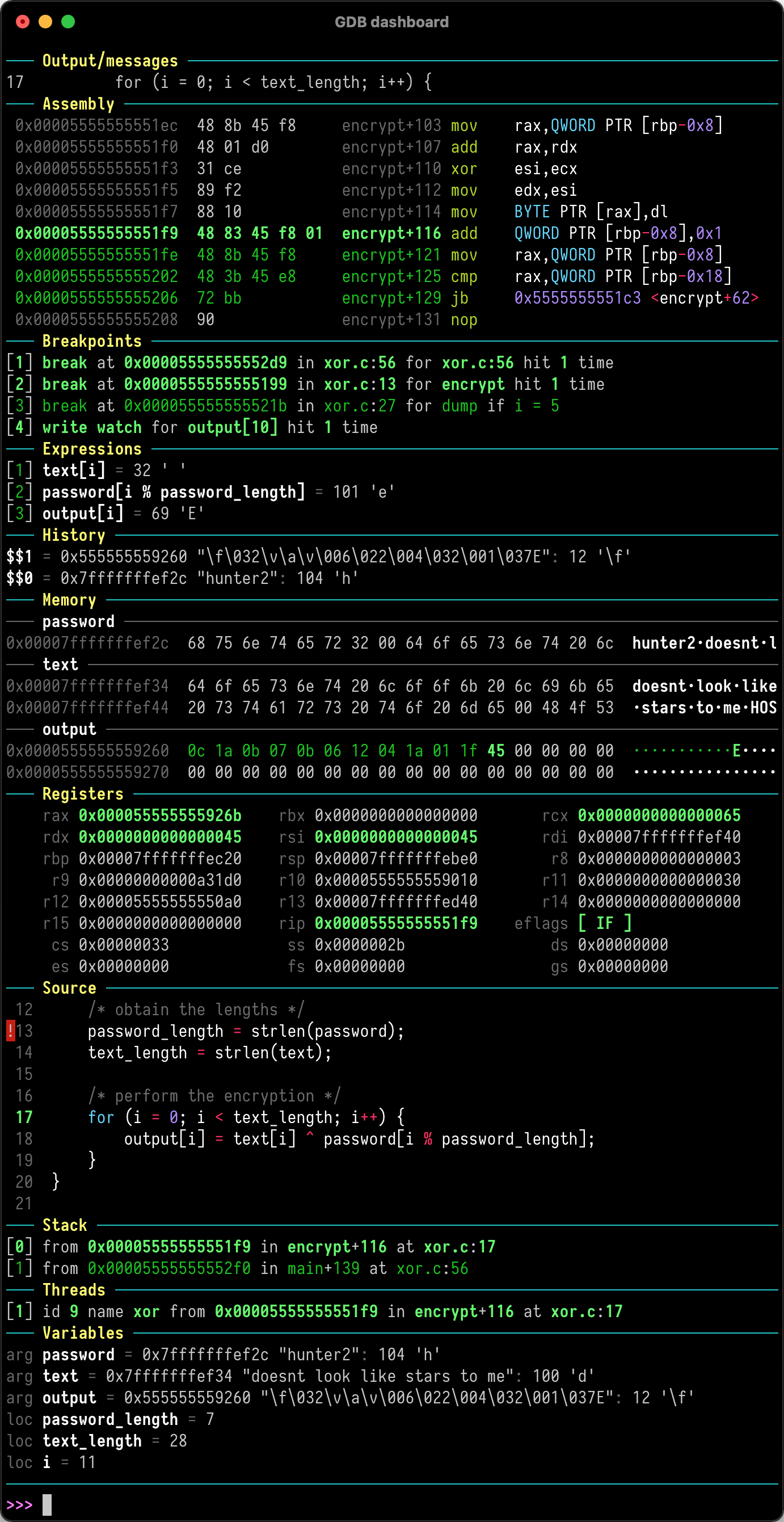
GDB dashboard is a single .gdbinit file written with GDB's Python API. It adds a modular interface that shows information about the program being debugged. The dashboard appears automatically every time the inferior program stops, so you need fewer manual GDB commands to inspect program state and can concentrate on control flow.
It does not redefine any existing GDB command. All of its features are available through one dashboard command, which is documented through help dashboard. If Pygments is installed, the dashboard uses it for syntax highlighting. The wiki covers the most common configuration and usage tasks.
It is for developers who debug native programs with GDB and want persistent visibility of program state. Setup is one file in the home directory, with no other GDB plugins required.
Installation
# via wget
wget -P ~ https://github.com/cyrus-and/gdb-dashboard/raw/master/.gdbinit
# via pip (optional syntax highlighting)
pip install pygments
Alternatives & related tools
AWS CLI
Official command line interface for Amazon Web Services, with profile-based credentials, configurable output, and shell tab completion.
harlequin
Terminal-based SQL IDE with database adapter support for DuckDB, SQLite, PostgreSQL, MySQL and dozens of other databases
Azure CLI
Microsoft's cross-platform command-line interface for managing Azure resources with az group/subgroup/command syntax, JMESPath queries, and tab completion.
textual-astview
TUI tool for exploring Python Abstract Syntax Trees (AST) with interactive tree view and source highlighting
peplum
Terminal-based browser and search interface for Python Enhancement Proposals (PEPs)
add a badge to your README
Maintain GDB dashboard? Show that it's featured on trmn. The badge links back to this page.

[](https://www.trmn.sh/tools/gdb-dashboard?utm_source=badge)<a href="https://www.trmn.sh/tools/gdb-dashboard?utm_source=badge"><img src="https://www.trmn.sh/badge/gdb-dashboard.svg" alt="Featured on trmn" height="20"></a>