PM2
Process manager for Node.js and Bun apps with a built-in cluster-mode load balancer, zero-downtime reload, log management and startup script generation.
PM2 is a production process manager for Node.js and Bun applications. It daemonizes applications, monitors them, and restarts them if they stop. Besides Node.js and Bun scripts (including TypeScript files), it can start Python, Ruby, and binaries in $PATH, for example pm2 start app.py. It runs on Linux, macOS, and Windows, and supports Node.js 18+ and Bun 1+.
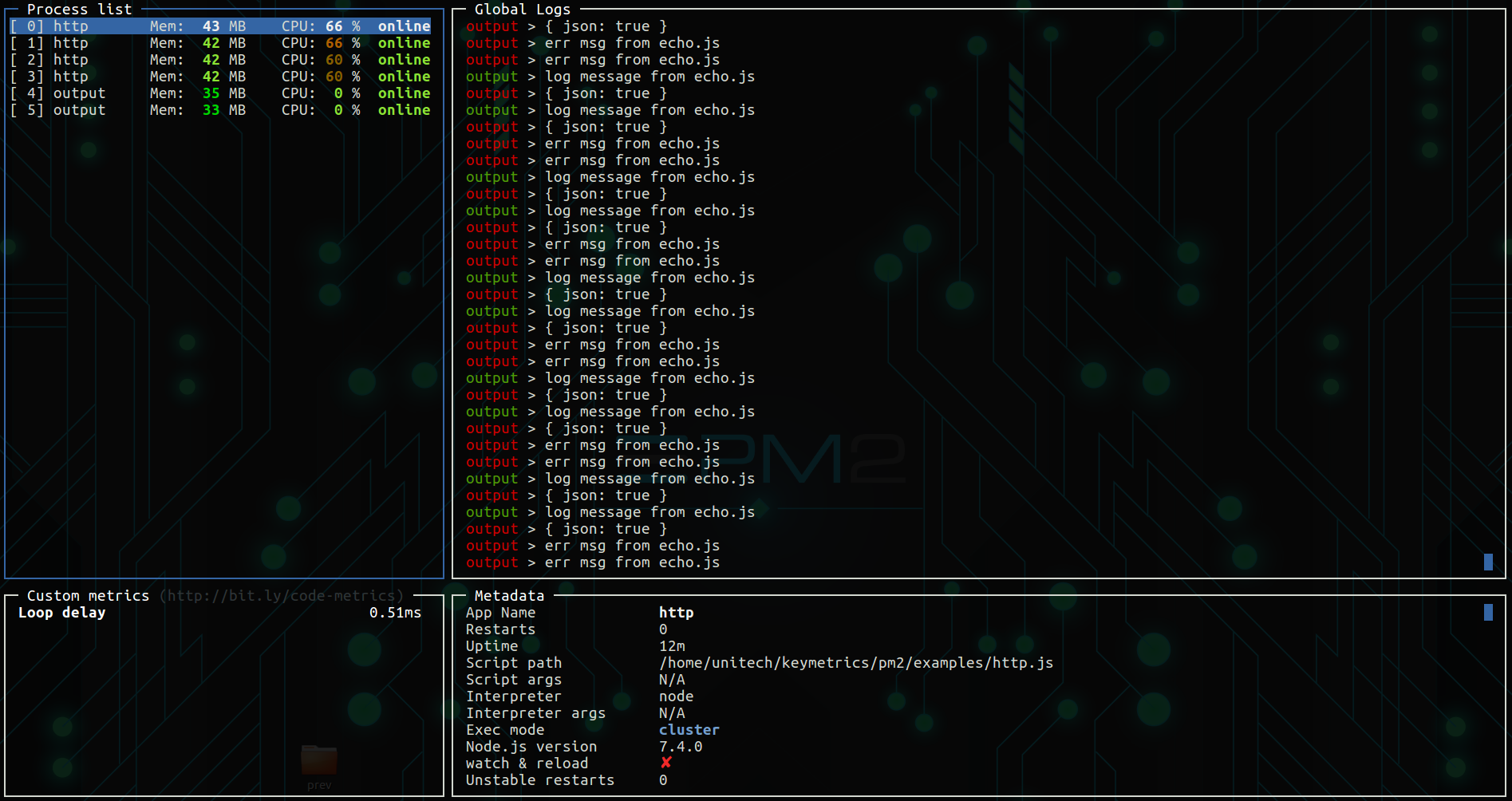
Day-to-day management uses commands such as pm2 list, pm2 stop|restart|delete <app_name|namespace|id|'all'|json_conf>, and pm2 describe for details on one process. pm2 monit opens a terminal dashboard for logs, custom metrics, and process information. pm2 logs shows logs in standard, raw, JSON (--json), or formatted (--format) output. pm2 flush and pm2 reloadLogs manage log files, and the pm2-logrotate module, installed with pm2 install pm2-logrotate, adds log rotation.
Cluster mode (pm2 start api.js -i <processes>) starts several Node.js processes and load-balances HTTP/TCP/UDP queries across them. The instance count can be max, -1 (all CPUs minus one), or a fixed number. pm2 reload all updates running applications without downtime. For deployment, pm2 startup generates a startup script for systemd, upstart, systemv, openrc, launchd, rcd, rcd-openbsd, or smf, and pm2 save persists the process list across reboots. pm2-runtime replaces the node command in containers, for example CMD ["pm2-runtime", "npm", "--", "start"] in a Dockerfile. PM2+ is a separate hosted dashboard for monitoring across servers.
PM2 is aimed at developers and sysadmins running Node.js or Bun services on single servers or VMs, and at teams that want process supervision inside Docker containers. It is licensed under AGPL 3.0.
Installation
# via npm
npm install pm2 -g
# via Bun
bun install pm2 -g

Alternatives & related tools
mpv
Free command-line media player supporting many audio/video formats, codecs and subtitle types, with GPU shader-based rendering and optional hardware decoding.
restic
Cross-platform backup program with encryption, deduplication, and support for local/cloud storage backends
tmux
Terminal multiplexer that creates, manages, and controls multiple terminal sessions from a single screen
btop
Terminal-based system resource monitor showing CPU, memory, disk, network, and process information
glances
Cross-platform system monitoring tool with real-time stats display via terminal, web interface, or API
add a badge to your README
Maintain PM2? Show that it's featured on trmn. The badge links back to this page.

[](https://www.trmn.sh/tools/pm2?utm_source=badge)<a href="https://www.trmn.sh/tools/pm2?utm_source=badge"><img src="https://www.trmn.sh/badge/pm2.svg" alt="Featured on trmn" height="20"></a>