bfs
Breadth-first variant of the UNIX find command with improved usability and helpful error messages
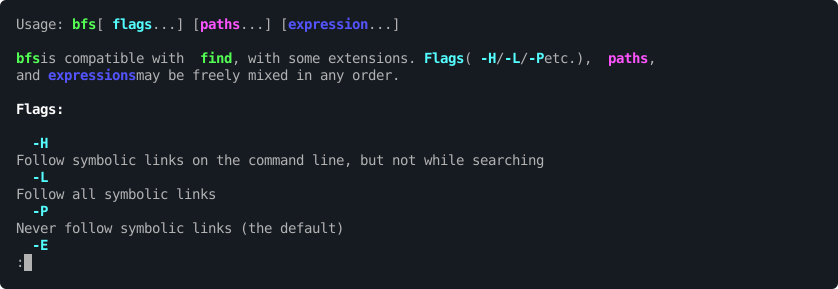
bfs is a file search tool that reimplements the UNIX find command using breadth-first search instead of depth-first traversal. This approach typically finds target files faster by exploring directories level by level, avoiding deep dives into irrelevant subdirectories before finding matches in shallow locations. The tool maintains compatibility with POSIX, GNU, and BSD versions of find while adding usability improvements.
Unlike traditional find implementations, bfs accepts command-line arguments in flexible order and provides helpful error detection with typo correction suggestions. It includes static analysis to warn about potentially incorrect expressions and offers enhanced operators like -exclude for skipping entire subtrees and -nohidden for ignoring hidden files. These extensions simplify common search patterns that require complex syntax in standard find.
The tool is designed for system administrators, developers, and power users who frequently search filesystems and want faster results with better error handling. It supports the same predicates, actions, and expressions as standard find implementations, making it a drop-in replacement for existing scripts and workflows.
Installation
# via Homebrew
brew install bfs
# via APT
apt install bfs
# via DNF
dnf install bfs
Alternatives & related tools
xleak
Excel file viewer and interactive TUI for terminal with multi-sheet support and export capabilities
fm
Terminal-based file manager built with Go and Bubble Tea framework
hazelnut
Terminal-based automated file organizer that watches folders and applies rules to move, copy, rename, or delete files based on patterns
deletor
File deletion tool with interactive TUI and CLI modes supporting filters, trash integration, and batch operations.
cull
Interactive TUI disk space analyzer for scanning directories, finding large files, and deleting them from the terminal.
add a badge to your README
Maintain bfs? Show that it's featured on trmn. The badge links back to this page.

[](https://www.trmn.sh/tools/bfs?utm_source=badge)<a href="https://www.trmn.sh/tools/bfs?utm_source=badge"><img src="https://www.trmn.sh/badge/bfs.svg" alt="Featured on trmn" height="20"></a>