
dysk
A Linux/Mac utility for listing and analyzing filesystem information with customizable columns, filtering, and output formats.
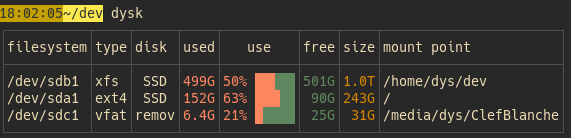
dysk is a filesystem listing utility for Linux and Mac systems that provides detailed information about mounted filesystems. The tool displays filesystem data in a customizable table format, showing information like mount points, available space, filesystem types, and usage statistics.
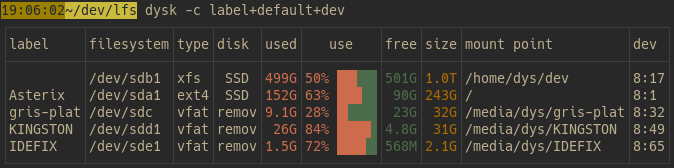
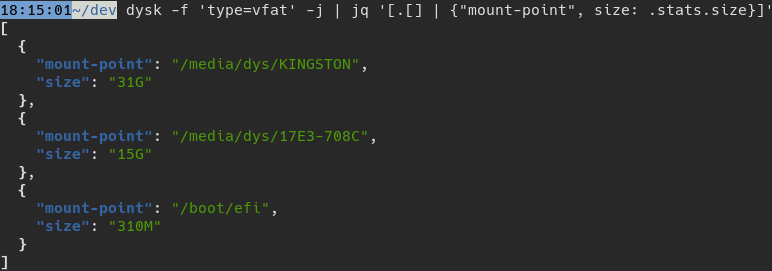
The utility supports flexible column selection, allowing users to choose which filesystem attributes to display. It includes filtering capabilities to show specific filesystems based on criteria, and sorting options to organize the output by different columns. dysk can export data in multiple formats including JSON and CSV, making it suitable for both interactive use and automated scripts.
The tool is built on the lfs-core Rust crate, which handles the underlying filesystem data collection. This makes dysk particularly useful for system administrators, DevOps engineers, and developers who need to monitor disk usage and filesystem status across Linux and Mac environments. The customizable output and multiple export formats enable integration with monitoring scripts and system analysis workflows.
Alternatives & related tools
zenith
Terminal-based system monitor with graphical metrics for CPU, memory, network, disk usage, and process management written in Rust
ncmpcpp
ncurses-based terminal client for MPD (Music Player Daemon) with tag editor, playlist editor, media library, and visualizer, inspired by ncmpc.
oxker
Rust TUI for viewing and controlling Docker containers, with log viewing, search, filtering, sorting, inspect and exec, configurable via TOML/JSON.
cyme
Cross-platform USB device lister and profiler that extends lsusb with modern features and better output formatting.
wiremix
TUI audio mixer for PipeWire that controls volumes, routes audio between devices and applications, and configures audio settings.
add a badge to your README
Maintain dysk? Show that it's featured on trmn. The badge links back to this page.

[](https://www.trmn.sh/tools/dysk?utm_source=badge)<a href="https://www.trmn.sh/tools/dysk?utm_source=badge"><img src="https://www.trmn.sh/badge/dysk.svg" alt="Featured on trmn" height="20"></a>