
hexyl
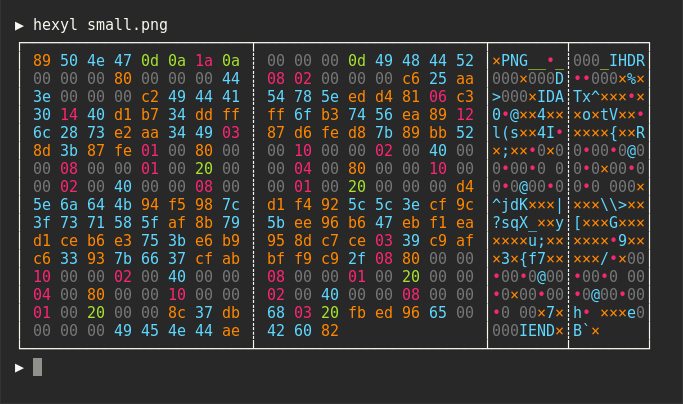
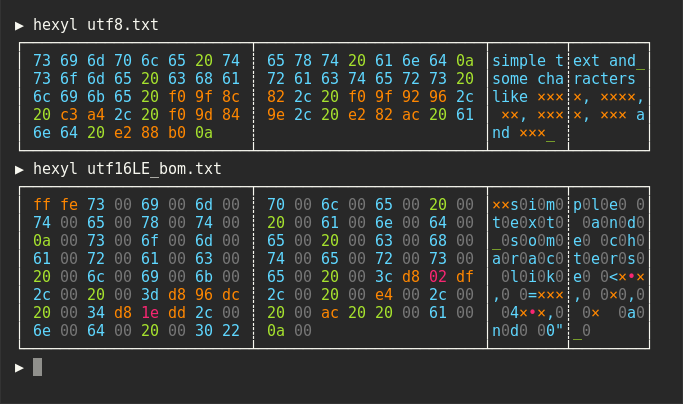
Terminal hex viewer that colors bytes by category: NULL, printable ASCII, whitespace, other ASCII, and non-ASCII.
hexyl is a hex viewer for the terminal. It prints the bytes of a file or input as a hex dump with a file offset column, and uses colored output to distinguish five categories of bytes: NULL bytes, printable ASCII characters, ASCII whitespace characters, other ASCII characters, and non-ASCII bytes. This makes structure in binary data, such as runs of zeros or text embedded in binary, visible at a glance.
Colors are configurable through environment variables: HEXYL_COLOR_ASCII_PRINTABLE, HEXYL_COLOR_ASCII_WHITESPACE, HEXYL_COLOR_ASCII_OTHER, HEXYL_COLOR_NULL, HEXYL_COLOR_NONASCII, and HEXYL_COLOR_OFFSET. Values can be any of the 8 standard terminal colors, their "bright" variants (e.g. bright blue), or RGB hex such as #abcdef.
hexyl is written in Rust and is packaged for many platforms, including Debian/Ubuntu, Fedora, Arch, Void, Gentoo, macOS (Homebrew, MacPorts), the BSDs, Termux, Nix, Guix, snap, and Scoop. On Windows, it needs a terminal that supports ANSI escape sequences, such as Windows Terminal. It is aimed at developers, reverse engineers, and anyone inspecting binary files or data from the command line.
Installation
# via Homebrew
brew install hexyl
# via apt
sudo apt install hexyl
# via Cargo
cargo install hexyl
Alternatives & related tools
grex
CLI tool that generates regular expressions from user-provided test cases automatically
tailspin
Log file highlighter (binary: tspin) that colors dates, numbers, IPs, UUIDs, URLs and more in any log format, with no config, and pages output through less.
sd
Find and replace CLI tool with regex support, string-literal mode, and faster performance than sed
watchexec
File watcher that runs commands when files change, with .gitignore support and cross-platform filesystem monitoring
zizmor
Static analysis tool that finds and fixes security issues in CI/CD configurations, including GitHub Actions workflows, Dependabot, and pre-commit.
add a badge to your README
Maintain hexyl? Show that it's featured on trmn. The badge links back to this page.

[](https://www.trmn.sh/tools/hexyl?utm_source=badge)<a href="https://www.trmn.sh/tools/hexyl?utm_source=badge"><img src="https://www.trmn.sh/badge/hexyl.svg" alt="Featured on trmn" height="20"></a>