duf
Disk usage utility with colorful output, filtering, and JSON export - replacement for df command
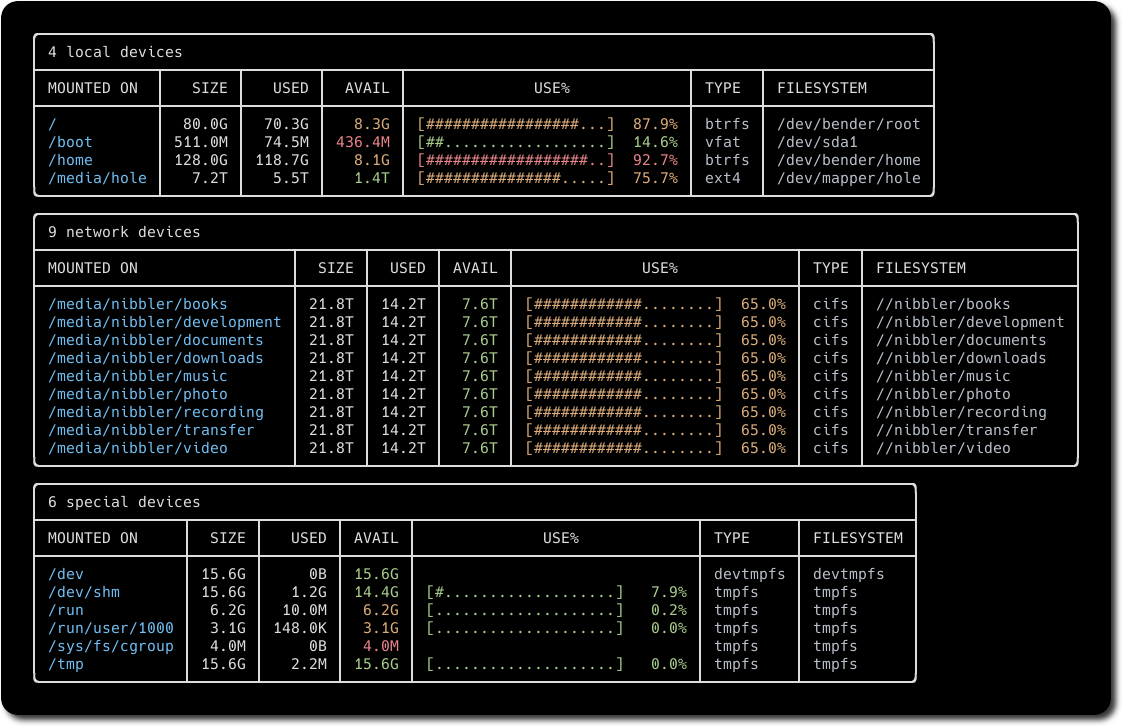
duf is a disk usage utility that serves as a modern replacement for the traditional df command. It displays filesystem usage information with colorful, user-friendly output that automatically adjusts to your terminal's theme and width. The tool works across Linux, BSD, macOS, and Windows systems.
duf provides extensive filtering capabilities to show or hide specific device types (local, network, fuse, special, loops, binds), filesystem types (tmpfs, vfat, etc.), or mount points. It supports wildcard matching for mount point filtering and can sort results by various criteria including size, usage, available space, or filesystem type. Users can customize the display by showing or hiding specific columns like mountpoint, size, used space, available space, and inode information.
The tool includes configurable color-coding thresholds to highlight disk usage levels in red, green, or yellow based on available space or usage percentages. For automation and scripting purposes, duf can export its output in JSON format. It supports both block usage display (default) and inode information display, making it suitable for system administrators and developers who need detailed filesystem monitoring capabilities.
Installation
# via Homebrew
brew install duf
# via APT
apt install duf
# via Pacman
pacman -S duf