witr
Traces a process, port, container, or file back to the chain of supervisors, services, and shells that started it. Offers CLI, JSON output, and a TUI.
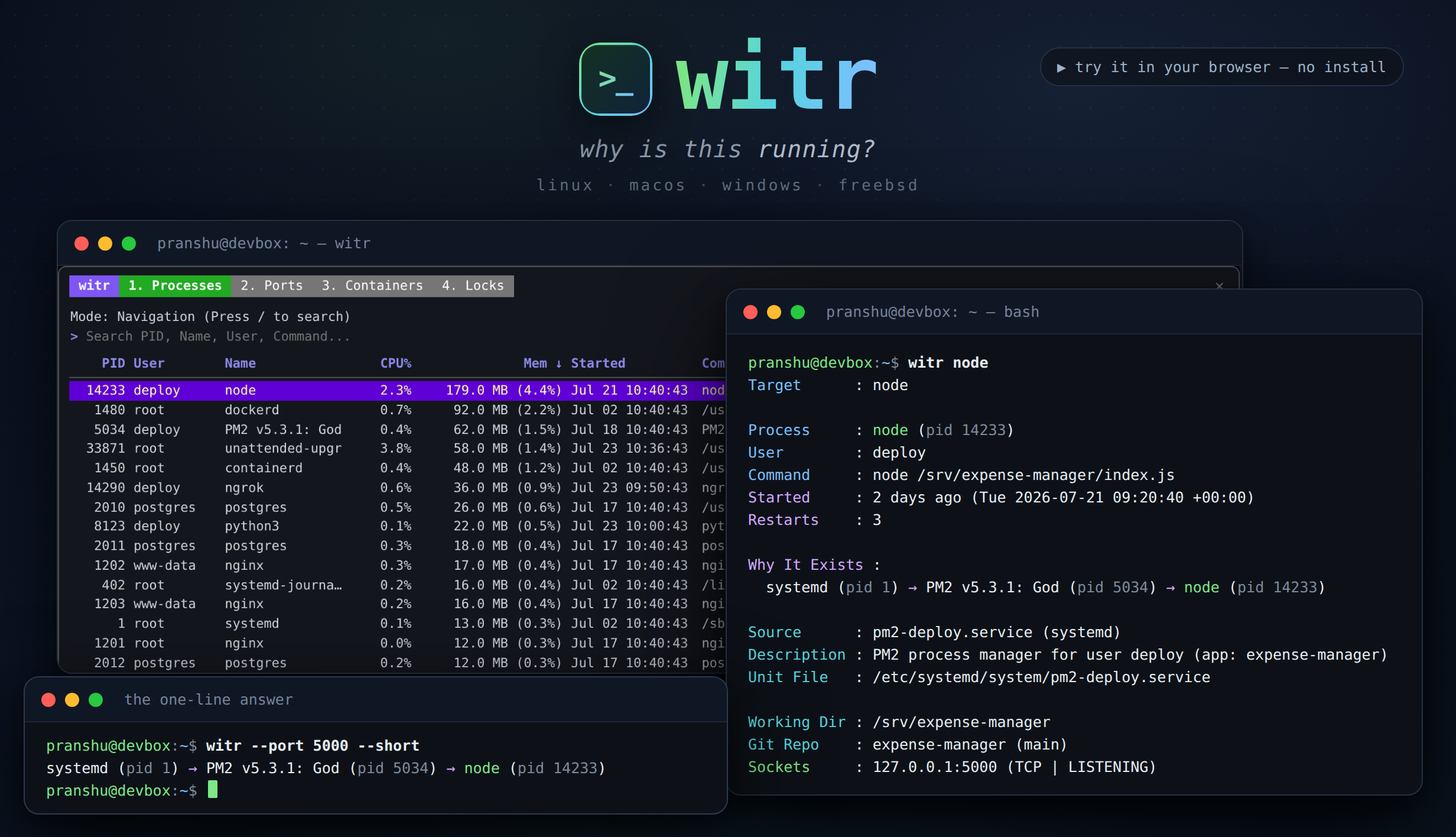
witr answers the question "why is this running?" for a process, service, port, container, or file. Tools such as ps, top, lsof, ss, systemctl, and docker ps show what is running and its metadata, but the user has to correlate their outputs to work out the cause. witr does that correlation and prints the causal chain, for example systemd → PM2 → node, in a single output.
It can be used as a one-shot command that prints human-readable output, as a command that emits machine-readable JSON, or as an interactive TUI dashboard. The CLI and TUI show the same ancestry chain. The README also links a browser-based sandbox with a simulated Linux box, including a guided tutorial, so the tool can be tried without installing it.
witr is distributed as a single static binary for Linux, macOS, FreeBSD, and Windows, for amd64 and arm64 on Unix. It is packaged for many ecosystems, including apt, Homebrew, MacPorts, Conda, AUR, Winget, Chocolatey, Scoop, npm, and FreeBSD Ports. Its users are developers, sysadmins, and SREs who need to find out what started an unexpected process or what is holding a port.
Installation
# via Homebrew
brew install witr
# via APT
sudo apt install witr
# via Install script (Unix)
curl -fsSL https://raw.githubusercontent.com/pranshuparmar/witr/main/install.sh | bash
Alternatives & related tools
age
File encryption tool with small explicit keys, post-quantum support, and UNIX-style composability.
ctop
Top-like interface for monitoring Docker and runC container metrics in real-time
duf
Disk usage utility with colorful output, filtering, and JSON export - replacement for df command
Kopia
Cross-platform backup tool that creates encrypted, compressed, deduplicated snapshots and stores them on cloud, network, or local storage. Includes CLI and GUI.
restic
Cross-platform backup program with encryption, deduplication, and support for local/cloud storage backends
add a badge to your README
Maintain witr? Show that it's featured on trmn. The badge links back to this page.

[](https://www.trmn.sh/tools/witr?utm_source=badge)<a href="https://www.trmn.sh/tools/witr?utm_source=badge"><img src="https://www.trmn.sh/badge/witr.svg" alt="Featured on trmn" height="20"></a>