dust
A disk usage analyzer that shows directory sizes with visual bars and intelligent tree traversal
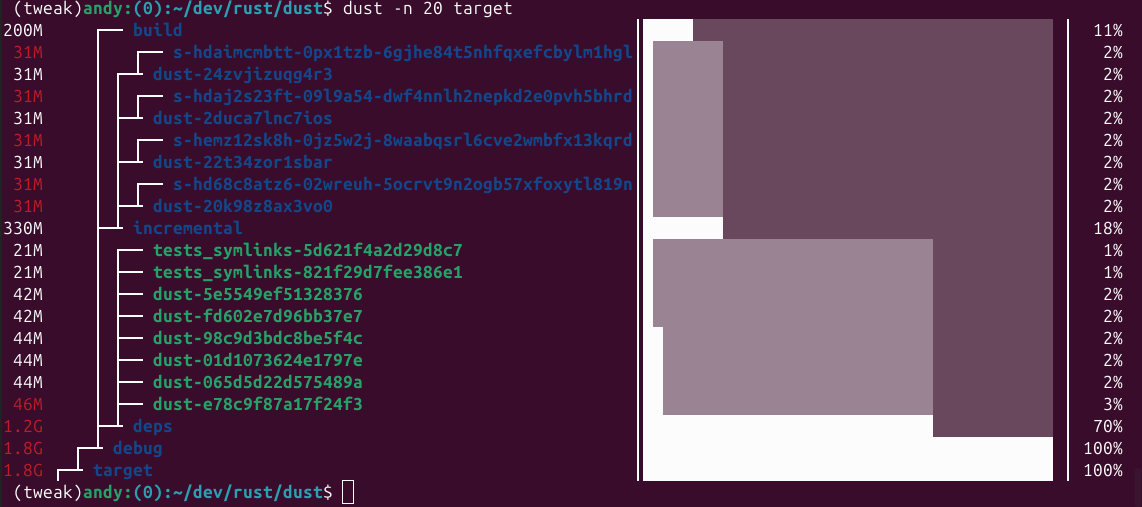
Dust is a disk usage analyzer written in Rust that displays directory sizes with ASCII bar charts and color-coded visual indicators. It automatically recurses through directory trees to identify the largest subdirectories and files, presenting them in a hierarchical view with percentage bars that show relative size within each level.
The tool uses intelligent traversal to surface the most significant disk usage without requiring manual sorting or filtering. It displays a terminal-height number of entries by default, with visual bars that change color and size to indicate both hierarchy and relative disk usage. Gray lines connect parent and child directories to show containment relationships.
Dust includes extensive filtering and display options: apparent size vs disk usage (-s), directory-only or file-only views (-D/-F), regex-based inclusion/exclusion (-e/-v), minimum size thresholds (-z), and JSON output (-j). It handles symbolic links, supports multiple output formats (binary/decimal units), and can group results by file type (-t) or count files instead of disk space (-f). Configuration can be stored in ~/.config/dust/config.toml for persistent settings.
Installation
# via Homebrew
brew install dust
# via Cargo
cargo install du-dust
# via Snap
snap install dust