Oh My Zsh
Community-maintained framework for managing zsh configuration, with 300+ plugins, 140+ themes, and a built-in updater.
Oh My Zsh is an open source framework for managing zsh configuration. It installs into ~/.oh-my-zsh (configurable via the ZSH environment variable) and generates a new ~/.zshrc, renaming any existing one to .zshrc.pre-oh-my-zsh. Plugins and themes are enabled by editing that file.
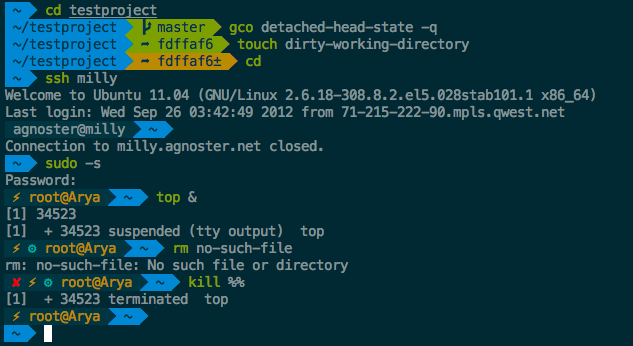
Functionality is split into plugins and themes. Plugins live in the repository's plugins directory and are listed in a plugins=(...) array in .zshrc, for example git, bundler, dotenv, macos, rake, rbenv and ruby. Each built-in plugin has its own README documenting the aliases and helper functions it adds. Themes control only the prompt appearance and are selected with ZSH_THEME (default "robbyrussell", alternatives such as "agnoster"). Setting ZSH_THEME="random" picks a theme per terminal session, and ZSH_THEME_RANDOM_CANDIDATES and ZSH_THEME_RANDOM_IGNORED restrict or exclude choices. Many themes need a Powerline or Nerd Font to render correctly.
The installer supports an --unattended flag for automated setups, which skips changing the default shell and does not launch zsh. It also supports a custom install directory, installing from a forked repository, manual installation, and a mirror at install.ohmyz.sh for regions that block raw.githubusercontent.com. The README also covers update handling, skipping aliases, enabling GNU ls on macOS and FreeBSD, an async git prompt, custom plugins and themes, and uninstalling. It targets zsh users on Linux, macOS, FreeBSD, Android and Windows via WSL2. It requires zsh (5.0.8 or newer preferred), git and curl or wget.
Installation
# via curl
sh -c "$(curl -fsSL https://raw.githubusercontent.com/ohmyzsh/ohmyzsh/master/tools/install.sh)"
# via wget
sh -c "$(wget -O- https://raw.githubusercontent.com/ohmyzsh/ohmyzsh/master/tools/install.sh)"
# via curl (mirror)
sh -c "$(curl -fsSL https://install.ohmyz.sh/)"
Alternatives & related tools
Powerlevel10k
Zsh prompt theme with an interactive configuration wizard, instant prompt at shell startup, Git status segments, and Powerlevel9k config compatibility.
zsh-autosuggestions
Zsh plugin that shows inline command suggestions after the cursor, drawn from history and tab-completion, in the style of Fish.
Spaceship Prompt
Customizable Zsh prompt that shows Git/Mercurial status, language runtime versions, Docker, Kubernetes, battery and more, with support for custom sections.
tpm
Tmux Plugin Manager: installs, updates, and removes tmux plugins from GitHub or other git repositories, configured via ~/.tmux.conf.
Pure
ZSH prompt that shows git branch, dirty state, and async-checked unpushed/unpulled arrows, with exit-status coloring and command execution time.
add a badge to your README
Maintain Oh My Zsh? Show that it's featured on trmn. The badge links back to this page.

[](https://www.trmn.sh/tools/ohmyzsh?utm_source=badge)<a href="https://www.trmn.sh/tools/ohmyzsh?utm_source=badge"><img src="https://www.trmn.sh/badge/ohmyzsh.svg" alt="Featured on trmn" height="20"></a>