zsh-autosuggestions
Zsh plugin that shows inline command suggestions after the cursor, drawn from history and tab-completion, in the style of Fish.
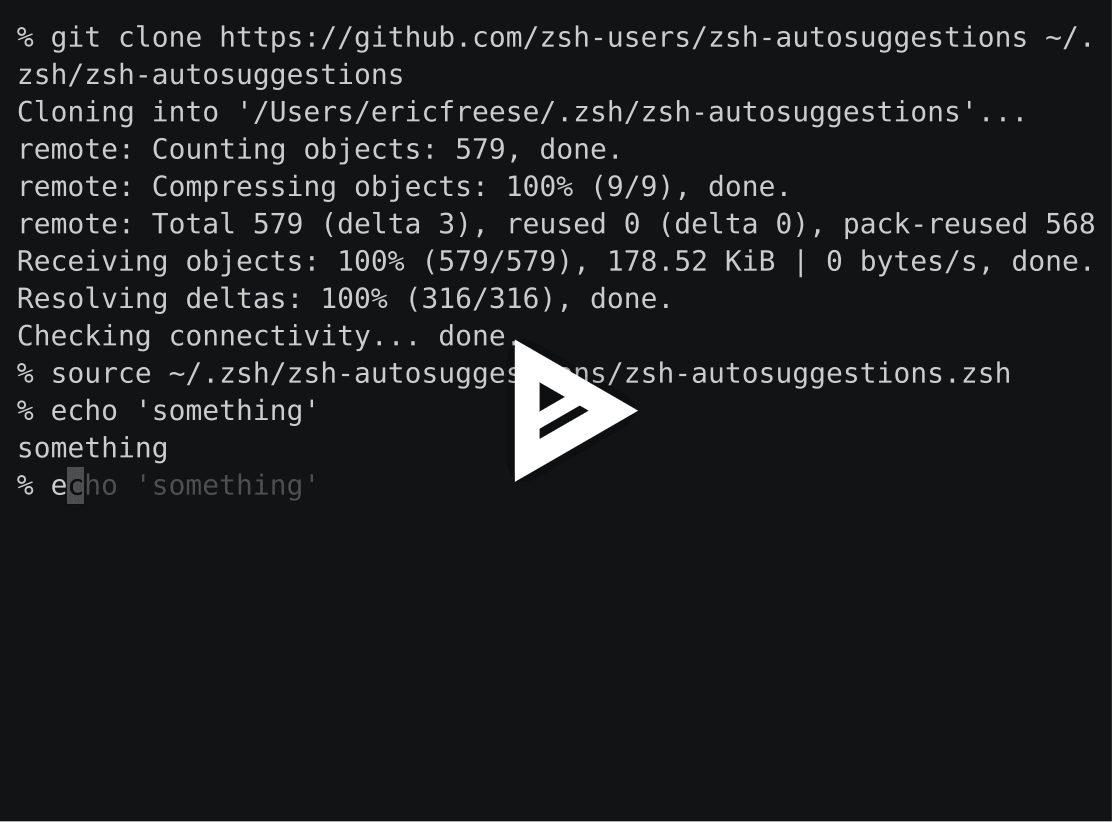
zsh-autosuggestions is a plugin for the Z shell that displays a suggested completion after the cursor as you type a command. The suggestion appears in muted gray by default (fg=8) and is based on command history and completions, similar to the autosuggestion behavior in Fish. It requires Zsh v4.3.11 or later.
Pressing the right arrow (forward-char) or End (end-of-line) with the cursor at the end of the buffer accepts the suggestion. Invoking forward-word accepts it partially, up to where the cursor moves. Suggestions are generated by a configurable ZSH_AUTOSUGGEST_STRATEGY array, whose entries are tried in order until one returns a match. The built-in strategies are history (most recent match), completion (what tab-completion would suggest, using the zpty module), and match_prev_cmd (the most recent history match whose preceding entry matches the last executed command).
Behavior is controlled through environment variables. You can change the highlight style with ZSH_AUTOSUGGEST_HIGHLIGHT_STYLE, and cap buffer size with ZSH_AUTOSUGGEST_BUFFER_MAX_SIZE. ZSH_AUTOSUGGEST_HISTORY_IGNORE and ZSH_AUTOSUGGEST_COMPLETION_IGNORE take glob patterns to filter out suggestions. Zle widget behavior is remapped through the ZSH_AUTOSUGGEST_*_WIDGETS arrays (clear, accept, execute, partial accept, ignore). Suggestions are fetched asynchronously by default on zsh 5.0.8 and later. Automatic widget re-binding can be turned off with ZSH_AUTOSUGGEST_MANUAL_REBIND for better performance.
The plugin also provides widgets for bindkey: autosuggest-accept, autosuggest-execute, autosuggest-clear, autosuggest-fetch, autosuggest-disable, autosuggest-enable, and autosuggest-toggle. It is aimed at zsh users who want history-based completion on the command line, including Oh My Zsh users, who can put the configuration in $ZSH_CUSTOM.
Alternatives & related tools
Spaceship Prompt
Customizable Zsh prompt that shows Git/Mercurial status, language runtime versions, Docker, Kubernetes, battery and more, with support for custom sections.
Powerlevel10k
Zsh prompt theme with an interactive configuration wizard, instant prompt at shell startup, Git status segments, and Powerlevel9k config compatibility.
tpm
Tmux Plugin Manager: installs, updates, and removes tmux plugins from GitHub or other git repositories, configured via ~/.tmux.conf.
Pure
ZSH prompt that shows git branch, dirty state, and async-checked unpushed/unpulled arrows, with exit-status coloring and command execution time.
Oh My Zsh
Community-maintained framework for managing zsh configuration, with 300+ plugins, 140+ themes, and a built-in updater.
add a badge to your README
Maintain zsh-autosuggestions? Show that it's featured on trmn. The badge links back to this page.

[](https://www.trmn.sh/tools/zsh-autosuggestions?utm_source=badge)<a href="https://www.trmn.sh/tools/zsh-autosuggestions?utm_source=badge"><img src="https://www.trmn.sh/badge/zsh-autosuggestions.svg" alt="Featured on trmn" height="20"></a>